HTML, CSS and JavaScript
Difference Between HTML and CSS
HTML is the language used to write the content and structure of a webpage, while CSS is the language used to write how the content will be displayed, in terms of things like positioning, colour, etc.
Think of HTML as an art gallery. The art gallery is a simple, plain, box-like gigantic room with no partitioning walls. There are lots of paintings hung up on walls, but they are just placed one after the other with no spacing on just one wall, and not evenly placed throughout the gallery.
Think of CSS as the interior architect and designer. CSS would add things like partitioning walls and paint the walls, and spread the paintings out so that there are no walls missing paintings, and generally adding a sense of visual balance and pleasure.
Control flow and loops
Control flow, in a computer program, is the step-by-step order in which each action of the program will happen. Following a specific sequence is usually necessary to make the whole program work. Think of grabbing a bite to eat from the fridge. You open the fridge, take the food out, put it in the microwave, heat it, take it out the microwave, and then eat it. You can't eat the food unless you take it out the fridge first, nor can you take it out the microwave unless you put it in there first.
Loops in a computer program is an action, or a series of actions, that is repeated a certain number of times. Think of a workout at the gym. You will do a set of bicep curls, in which you will do 12 repetitions. When you do a curl, you will lift the barbell up, and then lower it down. You will repeat those two actions: lift and lower - 12 times.
Document Object Model
The document object model (DOM) represents a file, eg. HTML, as a logical structure, and treats every part of the file, eg. an element, as an individual object. It is best to think of the DOM as a tree, and each element is a leaf.
If you were to open a website in Google Chrome, and use the Developer Tools, the DOM is represented as the HTML for the webpage, which allows for each element in the HTML to be selected individually. You can see various information about the element, and you can change something about the element, ie. its content or its style.
For example, if you were on John Smith's Facebook profile while using Google Chrome, you could right click on their name. Developer Tools will open and you will see details for the element containing the Facebook profile name, such as the font type and colour used. You could set the font colour to pink, or change the name from "John Smith" to "Bob Bobson".
Accessing Info in Arrays vs Objects
An array is a variable that holds multiple values. They are often used as lists, for example a list of strings of all the names of students in a class. This can include identical values.
var students = ["James", "Sarah", "Chris", "Jane", "Eric", "James", "John"];
You can access values in an array through indexing. In the above example, to get the name of the first student in the list, call students[0] and you will get James. To get the name of the last student in the list, you will have to read backwards, so you need to get the size of the array first using the length property. Call students[students.length-1] and you will get John.
Objects are also variables that can hold multiple values. But there's a catch. They must have properties, which are used to describe a value type. Each property must have a value assigned to it.
They are often used to describe detailed information in multiple values, about a single entity. For example, a person.
var person = { name: "Sam Jones", age: 40, gender: "Male" };
You can access values in an object by using dot notation involving the variable name and property of the value you want, ie. object.property, for example…
person.name returns Sam Jones, while person.age returns 40.
Functions
Functions are used to do things. First you create a function and set up the things you want to do. And then, you call that function whenever you want it to do those things you have set up to do.
For example, you can make a function say "Hello" with your name. You can do this by calling the sayHello function and adding your name between brackets, for example:
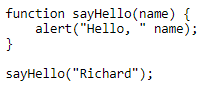
This displays an alert that says: Hello, Richard.
By creating functions, and naming them based on describing exactly what they do, you will make your code…
- Easy to read
- Not be repetitive
- Easier to understand in terms of the flow of logic
For example, if you wanted to write a program that introduces people, saying their name, age and gender, you don't have to repeat the same commands over and over again.
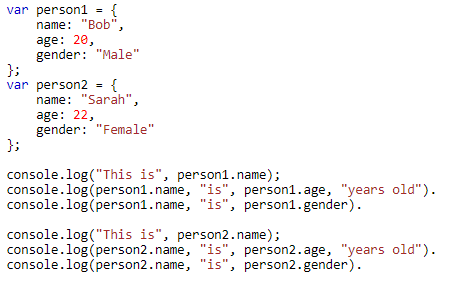
This is very repetitive.
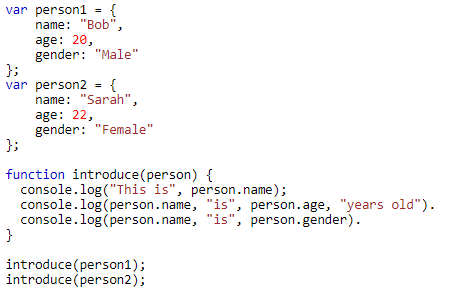
This does the exact same thing, but a lot more structure and less time wasted.